Comparison
Zebra DS9308 vs Newland FM3281: which counter scanner?
A tilting counter scanner you can pick up versus an upward-facing fixed-mount scanner with NFC and IP67: how the DS9308 and FM3281 differ and which fits where.
In this guide
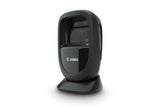
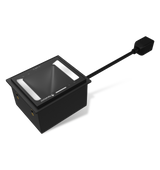
Both scanners read 1D and 2D bar codes on their own, without a trigger press, from paper and from phone screens. They are built for different places, though. The Zebra DS9308 is a counter scanner: it stands on a tilting base, faces the person holding up the item, and can be lifted for bulky goods. The Newland FM3281 Grouper is a fixed-mount scanner with its window facing up: you hold the code over it, and it is made to be built into kiosks, gates and counters. Choose the DS9308 for a staffed checkout. Choose the FM3281 for self-service points, access control and anywhere NFC cards or outdoor conditions come in.
| Zebra DS9308 | Newland FM3281 | |
|---|---|---|
| Our kit | DS9308-SR4U2100AZE: scanner with 2.1 m USB cable | NLS-FM3281-NFC-20: NFC version with 2 m USB extension cable |
| Design | Presentation scanner, window facing forward, built-in base with four positions from 15° back to 45° forward | Fixed-mount box, window facing up, mounting holes in the housing |
| Hand-held use | Yes: lift it and press the scan trigger | No |
| Image sensor | 1280 × 800 pixels | 1280 × 1088 pixels |
| Field of view | 52° horizontal, 33° vertical | 58.2° horizontal, 66° vertical |
| Reading distance, QR 20 mil | 0–191 mm | 0–270 mm |
| Reading distance, EAN/UPC 13 mil | 0–224 mm | 0–290 mm |
| Minimum print contrast | 15% | 25% |
| NFC | No | Yes: 0–30 mm, MIFARE, NTAG, ICODE, FeliCa and more |
| Keyboard countries | Over 90, including Estonian, Latvian, Lithuanian, Finnish, Polish and Czech | No Estonian, Latvian or Lithuanian entry; use Emulate ALT+Keypad |
| Enter after each scan | Off by default | Return listed as factory default |
| Interfaces | USB, RS-232, keyboard wedge, IBM 46XX (RS-485), chosen by cable | USB and RS-232; RS-485 and Wiegand on the NLS-FM3281-NFC-50 version |
| Input voltage | 4.5–5.5 V DC | 5–24 V DC |
| Sealing | IP52, spill-proof base | IP67 |
| Operating temperature | 0 to 50 °C | −20 to 60 °C |
| Size | 145 × 86 × 83 mm (H × W × D), 318 g | 78.7 × 47.7 × 67.7 mm (W × D × H), weight not published |
| Configuration software | Zebra 123Scan | Newland EasySet |
| Manufacturer warranty | 3 years | 5 years |
| Tilt tolerance (pitch / skew) | ±60° / ±60° | Same |
| Phone screens | Yes | Yes |
Figures from Zebra's DS9300 Series spec sheet and Newland's FM3281 product page and user guide. Reading distances are the manufacturers' typical maximums. Newland measured the FM3281 distances with illumination brightness at Level 2 (factory setting: Level 1, which gives a shorter range).
Choose the DS9308 if
- A cashier scans at a staffed counter and customers hold up items, coupons or phones
- Staff sometimes need to lift the scanner for bulky or heavy items
- The PCs use Estonian, Latvian or Lithuanian keyboard layouts and you want a direct keyboard setting
- Labels are faded or low in contrast
Choose the FM3281 if
- The scanner is built into a kiosk, self-service point, turnstile or gate
- People also present NFC cards, tags or phones
- It works outdoors, semi-outdoors or in the cold
- Your system needs RS-485 or Wiegand (NLS-FM3281-NFC-50 version)
What both scanners share
Out of the box both connect by USB as a keyboard, so whatever they read is typed where the cursor is, with no driver. Both read automatically: the DS9308 in presentation mode, the FM3281 in Sense Mode. Both are configured with programming bar codes from the manufacturer's guide or with free Windows software. Two defaults differ in daily use. The DS9308 sends no Enter after the data until you scan Add Enter Key (Carriage Return/Line Feed). The FM3281 has no keyboard setting for the Baltic layouts and uses Emulate ALT+Keypad ON on those PCs instead.
Placement and setup
The DS9308 needs no stand: set the base angle and place it facing the person who presents the items. Optional brackets fix it to a counter or wall, or lock it in place. The FM3281 lies flat or is built into a housing, and the code is held over its upward-facing window. For an NFC version, Newland asks you to keep metal at least 5 cm away.
Step-by-step instructions are in our DS9308 setup guide and our FM3281 setup guide. Keyboard settings and Enter for the Newland are in our FM3281 programming guide. Compare both kits in our shop: Zebra DS9308 and Newland FM3281 Grouper. More guides: DS9308 and FM3281.
Frequently asked questions
Can the Newland FM3281 be used as a handheld scanner?
No. It is a fixed-mount scanner with the window facing up. The DS9308 can be lifted and used with its scan trigger.
Do both scanners read QR codes on phone screens?
Yes. Both read printed and on-screen codes without a trigger press. The FM3281 reads from further away at its higher illumination level; the DS9308 has an enhanced mode for phones and displays.
Which one reads NFC cards?
Only the FM3281 NFC versions, such as our NLS-FM3281-NFC-20. The DS9308 reads bar codes only.
Which scanner is better for a supermarket or shop checkout?
The DS9308. It is designed for staffed counters, faces the customer, reads low-contrast labels and can be picked up for large items.
Was this guide helpful?
More DS9308 guides
Related guides
Still stuck?
Contact support
Send us your model and a short description of the problem. Our team will help you find a solution.